


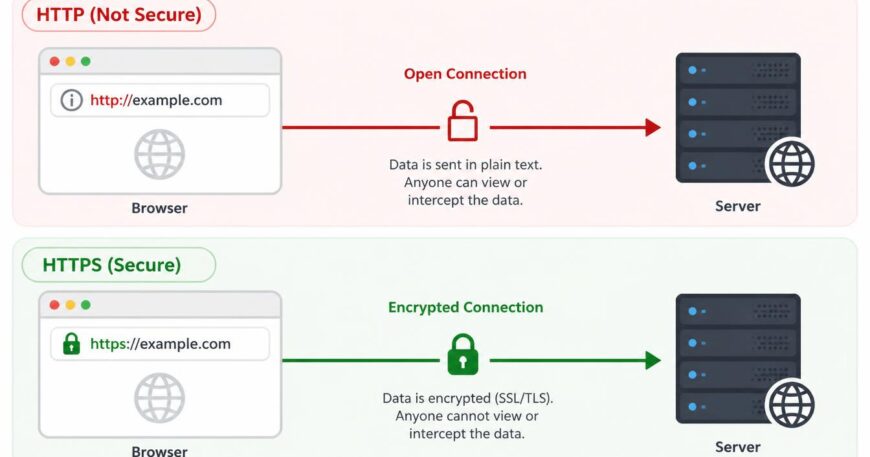
The difference between HTTP and HTTPS is encryption. HTTP sends data between a browser and a web server as readable plain text. HTTPS sends the same data through a TLS-encrypted connection, so it can’t be read or altered in transit, and a certificate proves the site is genuine. Every business website in Australia should use HTTPS.
One letter, and it changes everything. The “S” decides whether the passwords, enquiry forms and card details your visitors type in are protected or exposed. It also decides what the browser says about you before anyone reads a word of your page.
That last part is about to matter more. Google’s Chrome team will switch on “Always Use Secure Connections” by default with Chrome 154 in October 2026, which means Chrome will ask visitors for permission before it opens a public site that can’t use HTTPS. Google
Systronic has been building websites for Australian businesses since 2009. This guide explains the difference, how HTTPS works, what it does for SEO, and how to move a site across without breaking it.
Key takeaways
- HTTP is unencrypted. HTTPS is HTTP running inside TLS encryption.
- HTTPS protects three things: privacy, integrity and identity.
- It’s a small Google ranking signal, but the real value is trust and conversions.
- A free Let’s Encrypt certificate gives the same encryption as a paid one.
- The padlock means the connection is private. It doesn’t mean the site is trustworthy.
What Is HTTP?
HTTP (Hypertext Transfer Protocol) is the set of rules browsers and web servers use to exchange web pages. It sends everything as plain text over port 80, so anyone on the network path can read or change it.
When you click a link, your browser sends an HTTP request and the server replies with the page’s HTML, images and scripts. It works fine. The problem is that it was designed in an era when nobody expected strangers to be listening.
On café Wi-Fi, a hacked router or any untrusted network hop, someone can read that traffic or slip something into it. For a public price list, that’s a minor risk. The moment a visitor types a password or a phone number, it isn’t.
What Is HTTPS?
HTTPS (Hypertext Transfer Protocol Secure) is HTTP delivered over an encrypted TLS connection on port 443. The requests and responses are identical to HTTP. What changes is that the data is scrambled in transit and the server has to prove its identity with a certificate.
You’ll still hear “SSL certificate”. SSL is the older protocol that TLS (Transport Layer Security) replaced, and the name stuck. What hosts sell as an “SSL certificate” today is a TLS certificate. Current sites should run TLS 1.2 or 1.3. TLS 1.3 is defined in RFC 8446, and SSL and early TLS versions are deprecated.
HTTPS gives you three things:
- Privacy: data is encrypted, so an interceptor sees noise.
- Integrity: if data is changed on the way, the connection detects it.
- Authentication: the certificate confirms you’ve reached the real domain.
HTTP vs HTTPS: What Are the Key Differences?
| Feature | HTTP | HTTPS |
| Full name | Hypertext Transfer Protocol | Hypertext Transfer Protocol Secure |
| Encryption | None (plain text) | TLS encryption |
| Default port | 80 | 443 |
| Certificate | Not needed | Valid TLS certificate needed |
| Tampering | Can be changed in transit | Detected |
| Browser display | “Not secure” label; permission prompt in Chrome 154+ | Secure connection indicator |
| Google ranking | No benefit | Small ranking signal |
| HTTP/2 and HTTP/3 | Not supported in browsers | Supported |
| Right for | Nothing that collects data | Every website |
How Does HTTPS Work?
HTTPS works through the TLS handshake. The browser and server agree on an encryption method, the server proves its identity with a certificate, and both sides create temporary keys for that visit. All data after that point is encrypted. It takes a fraction of a second and happens before any page content loads.
- Your browser says hello and lists the TLS versions and ciphers it supports.
- The server picks the strongest match and sends its certificate.
- The browser checks the certificate: trusted issuer, correct domain, not expired.
- Both sides agree on session keys unique to that visit.
- Encrypted traffic begins and the page loads.
The certificate contains the site’s public key, its domain name, the issuing authority and an expiry date. If any check fails, the browser blocks the page with a full-screen warning. That’s why an expired certificate feels like the site is down: to a visitor, it is.
Why Does HTTPS Matter for Australian Businesses?
HTTPS matters because it protects customer data, keeps browsers from warning visitors away, and supports your privacy and payment obligations. Any site with a contact form, login or checkout collects personal details and needs it.
Trust. Chrome has flagged HTTP pages as “Not secure” since 2018. Someone who came to book a service sees a warning before they see your offer, and plenty of them leave.
Privacy. If the Privacy Act 1988 applies to your business, Australian Privacy Principle 11 requires you to take reasonable steps to protect the personal information you hold. Encrypting form submissions is one of the cheapest steps available. No Australian law says “you must use HTTPS” in those words, and HTTPS alone doesn’t make you compliant, but sending customer details in plain text is hard to defend after a breach. The OAIC publishes guidance on these obligations. This isn’t legal advice.
Payments. The PCI DSS standard from the PCI Security Standards Council requires strong cryptography when cardholder data crosses open networks. Even if Stripe or PayPal handles the checkout, the rest of your store should be on HTTPS. If you’re planning an online shop, our e-commerce website service builds this in from day one.
It’s not just shops. Contact forms, booking forms, logins and newsletter sign-ups all collect personal details. A five-page site for a local trade needs HTTPS as much as a big retailer does.
Does HTTPS Help SEO?
Yes, but only a little. Google confirmed HTTPS as a lightweight ranking signal in 2014 and it hasn’t grown into a major factor. It won’t rescue weak content. Its real SEO value is removing problems: security warnings, split URLs and lost referral data.
Here’s what it actually does for you:
- Visitors don’t bounce off a security warning.
- When both versions of a page exist, Google generally picks the HTTPS one as canonical.
- Analytics stay accurate. Referral data is dropped when a visitor clicks from an HTTPS site to an HTTP one, so those visits can be misfiled as “direct”.
- You can use HTTP/2 and HTTP/3, which help page speed.
Think of it like a mobile-friendly design. You don’t get points for having it, you get penalised for not having it. Rankings come from content, links and technical quality built on top. If you want help with that, our search engine optimization team can audit your site, and our post on the benefits of SEO covers where the return comes from.
Does HTTPS Slow Down a Website?
No. On a modern setup, HTTPS is usually as fast as HTTP and often faster. The old slowdown came from expensive handshakes. TLS 1.3 cut the handshake down, browsers only support HTTP/2 over HTTPS, and HTTP/3 (RFC 9114) is encrypted by design.
If your site is slow, look at oversized images, cheap hosting and a pile of plugins first. Quality domain and hosting moves the needle far more than the protocol does.
What Types of SSL/TLS Certificates Are There?
There are four main types: Domain Validated (DV), Organisation Validated (OV), Extended Validation (EV), and wildcard or multi-domain certificates. They differ in how much identity checking sits behind them, not in encryption strength.
- DV: proves you control the domain. Issued in minutes. Enough for most small business and brochure sites.
- OV: also verifies your organisation. More paperwork.
- EV: strictest checks. Browsers no longer show a special green bar, so the visible benefit is small.
- Wildcard / multi-domain: one certificate covering all subdomains, or several domains.
Is a free certificate good enough? For most sites, yes. Let’s Encrypt issues free DV certificates trusted by all major browsers, and many hosts install them automatically. The encryption is the same as a paid certificate. Paid options add organisation validation, warranties and support.
One thing to plan for: certificate lifetimes are shrinking. Let’s Encrypt certificates last 90 days, and under CA/Browser Forum rules the maximum lifetime for public certificates dropped to 200 days in March 2026, with 100 days planned for 2027 and 47 days for 2029. Automatic renewal isn’t optional any more.
How Do You Check Whether a Website Uses HTTPS?
Look for https:// at the start of the address and a lock or connection icon. Click it to see the certificate, including who issued it and when it expires.
Then type the http:// version of your own address. It should jump to https:// straight away. For a deeper check, the free Qualys SSL Labs test grades your server’s TLS setup.
How Do You Move From HTTP to HTTPS?
Install a certificate, redirect every HTTP URL to HTTPS with a 301, update internal links, canonicals and your sitemap, then add the HTTPS property in Google Search Console. Installing the certificate alone isn’t a migration.
- Back up. Files and database, before you touch anything.
- Install the certificate. Most hosts do this from the control panel.
- Update the site address. In WordPress, change both addresses under Settings > General to https://.
- Add a site-wide 301 redirect. A permanent redirect tells Google the HTTPS version is the real one (our guide to 301 vs 302 redirects explains why). On Apache, a typical .htaccess rule is:
RewriteEngine On
RewriteCond %{HTTPS} off
RewriteRule ^(.*)$ https://%{HTTP_HOST}%{REQUEST_URI} [L,R=301]
Rules vary by server, so test on a copy first.
5. Fix internal resources. Update links, images, scripts and stylesheets still pointing to http://.
6. Update canonicals, sitemap and robots.txt to HTTPS URLs.
7. Tell Google. Add the HTTPS property in Search Console, submit the new sitemap, and update Analytics, ad accounts, social profiles and your Google Business Profile with the new address.
8. Test and crawl. Submit your forms, run a test checkout, and crawl the site for broken links and 404 errors.
Rankings can wobble for a few weeks after any URL change. With clean 301s they usually settle.
What Are the Most Common HTTPS Mistakes?
- Mixed content. An HTTPS page loading an image, script or stylesheet over HTTP. Browsers block risky items like scripts and flag the rest, which can break layouts and features.
- Expired certificate. Visitors hit a full-page warning. Automate renewal and set a reminder as backup.
- Redirect chains and loops. http to https to www to non-www is three hops. Aim for one. Loops often happen when a CDN and your server disagree about who handles SSL.
- Name mismatch. A certificate for example.com.au that doesn’t cover www.example.com.au throws errors for anyone who types the www.
- Turning on HSTS too early. The Strict-Transport-Security header forces HTTPS for your domain for a set time. It’s good protection but hard to undo. Start with a short duration and raise it once everything works.
- Forgotten old URLs. Old campaign pages, subdomains and download links that are still HTTP-only. With Chrome 154 arriving in October 2026, these are the ones visitors will start seeing prompts on.
Does the Padlock Mean a Website Is Safe?
No. The padlock only means the connection between you and that domain is encrypted. Phishing sites can hold valid certificates too. A padlock says nothing about malware, weak passwords or outdated plugins, so you still need to check that the domain itself is the right one.
Security is ongoing work: updates, backups and monitoring. That’s a big part of what good website development and support covers.
Frequently Asked Questions
Is HTTPS better than HTTP?
Yes. HTTPS encrypts data, detects tampering and verifies the site’s identity. HTTP does none of that. There’s no good reason for a business website to stay on HTTP.
Is HTTPS required by law in Australia?
No Australian law names HTTPS specifically. But if you collect personal information, the Privacy Act’s requirement to take reasonable steps to protect it makes HTTPS the sensible minimum.
Does HTTPS improve SEO?
A little. Google treats it as a lightweight ranking signal, and it removes browser warnings and enables faster protocols. It won’t rank a site on its own.
Is HTTPS free?
It can be. Many hosts include free Let’s Encrypt certificates. Paid ones add organisation validation, warranties and support, but the encryption is identical.
Will switching to HTTPS hurt my rankings?
Not if it’s done properly. Use 301 redirects, update internal links and your sitemap, and add the HTTPS property in Search Console. Expect small movements for a few weeks.
What is the difference between SSL and TLS?
TLS is the newer, secure version of SSL. People still say “SSL” out of habit, but any certificate sold today runs on TLS.
Which port does HTTPS use?
- HTTP uses port 80.
How can I tell if a website uses HTTPS?
Check that the address starts with https:// and look for the lock or connection icon. Clicking it shows the certificate details.
Final Thoughts
HTTP and HTTPS both deliver web pages, but only one protects the people using your site. HTTPS keeps customer details private, avoids browser warnings, and sits underneath faster protocols and cleaner analytics. With Chrome changing its default this October, it’s also the cheapest fix on your to-do list.
If your website still shows “Not secure”, or you’re planning a new one, our team can help. Have a look at our website design services, or get in touch for a quote.
